

Repair Intake Form Template (Free PDF, Letter): What to Include and How to Fill It In
A good repair intake form prevents the arguments that cost a repair shop the most: about scratches, missing accessories and extra costs. This guide explains what to include, how to fill it in at the counter, and what to check at pickup, with a free printable template (US Letter) that has a tear-off claim stub for the customer.
1. Intake form, claim ticket, work order
| Repair intake form | The sheet filled in when an item is dropped off: customer, item, problem, condition, estimate. The shop keeps it. |
|---|---|
| Claim ticket / claim stub | The customer's copy, with the same number. They bring it back to pick up the item. Often the tear-off bottom of the intake form. |
| Work order / repair ticket | The sheet that travels with the item through the workshop. In a small shop, the intake form usually doubles as the work order. |
2. What to include
| Section | Fields | Why |
|---|---|---|
| Customer | Name, phone, how and when to contact them | Without a way to reach them, an estimate can't be approved |
| Item | Type, brand and model, color and marks, serial number, quantity, accessories left with it | So it can't be confused with a similar item, and nothing goes missing |
| Problem and request | The problem in the customer's words, what they want (repair, estimate only, inspection), budget limit | "Fix the buzz" and "full setup" are different jobs with different prices |
| Condition at drop-off | Scratches, dents, missing parts, checked together with the customer, and who checked | Prevents "that scratch wasn't there before" at pickup |
| Estimate and due date | Rough estimate, whether to call before work or go ahead up to an amount, approval date, ready-by date, payment and deposit | Agreeing the rule for extra costs up front avoids the most common dispute |
| Staff and progress | Who took it in, who's repairing it, progress ticks, pickup checks | Anyone at the counter can answer "is it ready?" |
| Terms and signature | Extra costs, condition, unclaimed items, data loss; customer signature | The customer has read the rules that matter most |
3. Free template and filled-in sample
US Letter, one page. Top: shop copy. Bottom: tear-off claim stub. Free, no sign-up.
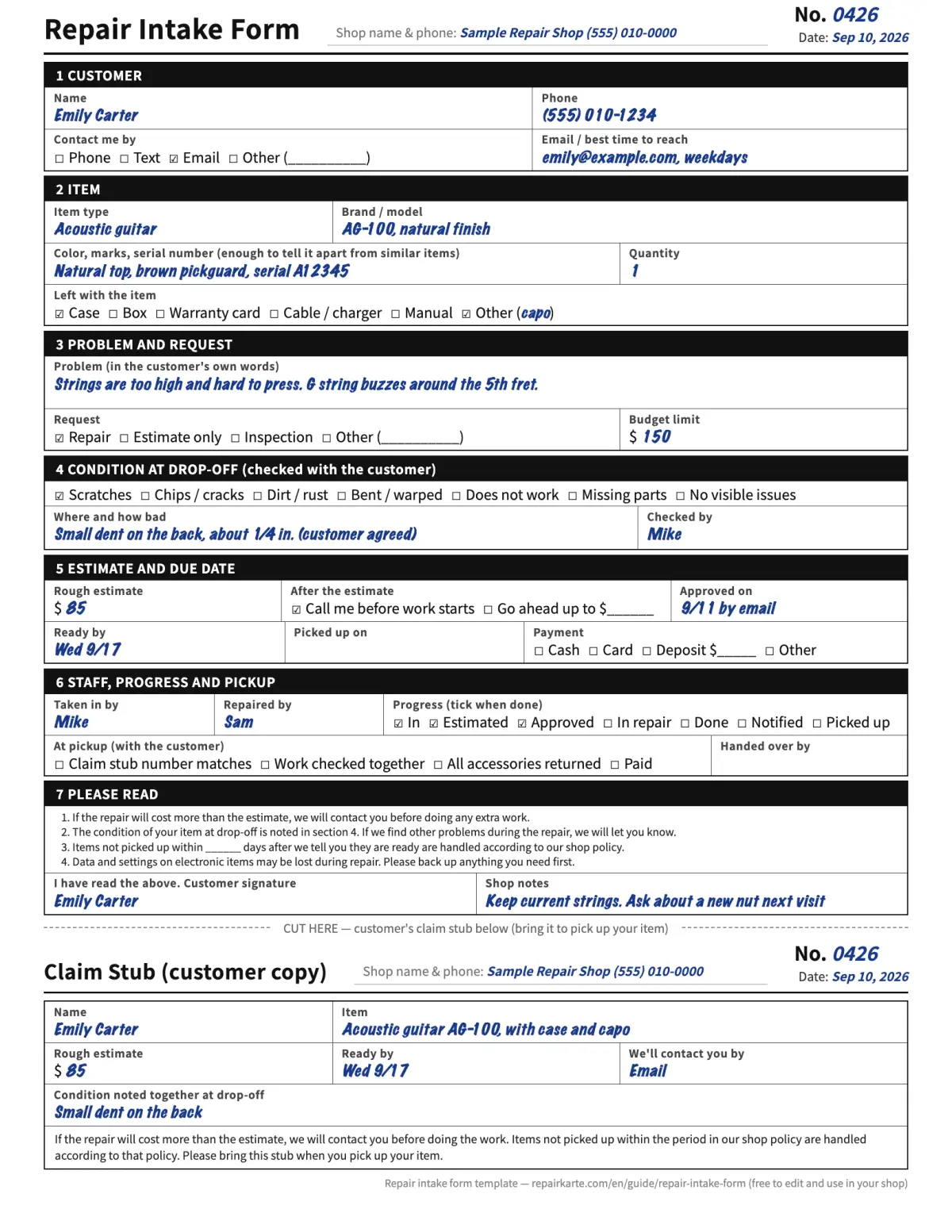
4. Filling it in at the counter
- Number first. Write the same number on the form, the claim stub and a tag on the item
- Customer details, and how they want to be contacted
- The item, with something that tells it apart (serial number, a mark, a color)
- The problem in the customer's own words. Ask them to show you if they can
- Look over the item together and mark its condition. Point out anything you find
- Agree on the estimate rule: call before work, or go ahead up to an amount
- Read the terms with them, get the signature, tear off the claim stub and hand it over
5. Fields people forget
- Accessories. The case, strap or charger that came in and didn't go back out. Tick them at drop-off.
- Condition. Left blank when the shop is busy, and needed most when something goes wrong.
- The rule for extra costs. Without it, you either stop work to call or risk a surprised customer.
- Contact preference. Some customers never answer calls but read email at once.
- Serial number. Two black guitars, two silver watches. The serial is what tells them apart.
6. At pickup
- ☐ The claim stub number matches the form
- ☐ Check the work together with the customer, against the problem they described
- ☐ Return every accessory ticked at drop-off
- ☐ Payment received, deposit subtracted, receipt given
- ☐ Write the pickup date and who handed it over
7. When paper stops working
Paper works while the forms fit in one drawer and one person answers the phone. It starts to strain when you can't find a form while the customer waits, when two people need the same form, or when you spend your day calling customers to say their item is ready.
At that point a spreadsheet helps with finding things, and repair software helps with the calls. See how to choose repair shop software.
8. From paper forms to Repair Karte
Everything on this form has a place in Repair Karte, on every plan including Free (up to 100 repairs a month):
- The check-in screen covers the customer, the item, the problem, the estimate and the due date; add your own fields (accessories, measurements, anything you always ask) on top.
- The customer signs on screen, and the signature stays on the record.
- Inspection checklists cover the condition at drop-off and the checks before handover.
- Claim tags print from a PDF on Letter or A4.
- Every repair has a status page where the customer approves the estimate instead of by phone. From Standard, the claim tag carries a QR code to that page and updates are emailed automatically.
See it for your trade: shoe repair, watch repair, alterations, or try a practice shop without signing up.
9. Frequently asked questions
What should a repair intake form include?
Customer contact details, the item with something that identifies it (such as a serial number), accessories left with it, the problem in the customer's words, the condition at drop-off, the estimate and the rule for extra costs, a due date, and the customer's signature. The template on this page has all of these on one Letter page.
Is the template free to use and change?
Yes. Print it, change it and use it in your shop. No sign-up needed.
Do I need a separate claim ticket?
Not with this template. The bottom part is a claim stub with the same number: tear it off and give it to the customer.
Is there an A4 version?
This English template is US Letter. Our Japanese template is A4. If you print on A4, choose "fit to page" in the print dialog.
The Free plan covers up to 100 repairs a month for 1 staff login, with no credit card, and stays free. Automatic email updates to customers start on Standard. Every new account gets all Pro features free for 30 days.
More guides
By trade