

What if you had
one more hour a day?
Let Repair Karte shorten the time you spend on intake, tracking repairs and keeping customers updated, and spend more of your day on repairs.




About
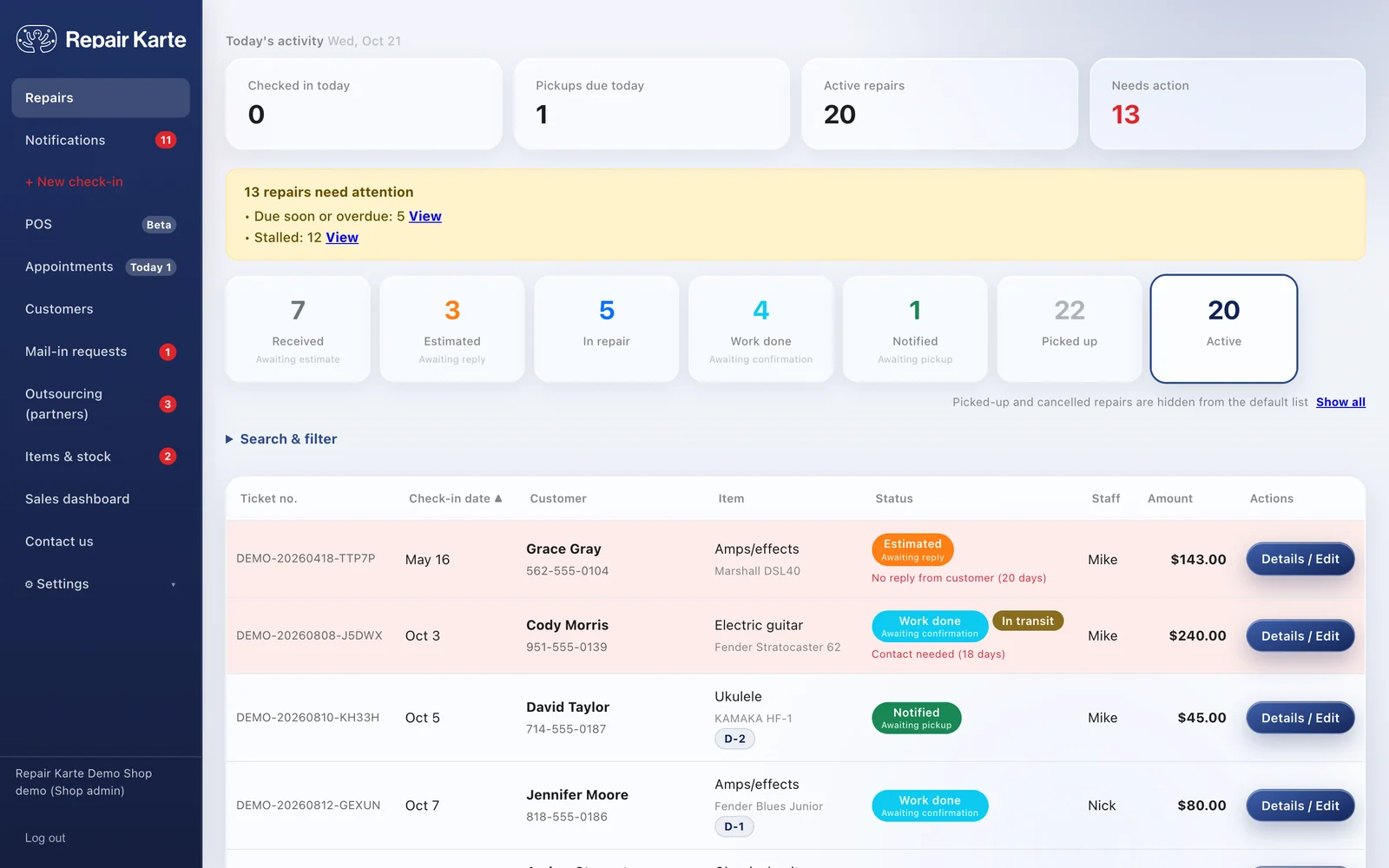
Repair Karte is cloud-based repair management software for repair shops. Tickets, customer updates, checkout and inventory, all in your browser.
Item, symptoms, price and due date on one record, so check-in goes smoothly. Leave bulky paper slips and hard-to-use systems behind and keep every repair neatly organized. Take in several items at once and print check-in tags too. Less time on paperwork, more time at the bench.
Learn moreMove a repair to Estimated or Work done, and the customer is contacted automatically. No more calling the same customer twice because nobody passed it on, or ringing people who never pick up. Customers don't have to take a call at a bad moment; they read your update when it suits them. And because it's all in writing, there's no "I never said that".
Learn moreHistory is kept per phone number, so next time you can say “same symptom as last time.”
Learn moreCheck out a repair and the case or strings sold with it in one sale. Deposits and advance card payments are already taken off, change is worked out for cash, and at the end of the day Check / Close shows any cash over or short.
Learn moreAdd parts and materials to a ticket, and stock goes down when the work is done. Items sold at the POS come off too. Anything running low is listed under Needs ordering, so there is no separate stock sheet to keep.
Learn moreCustomers enter their address, item and payment method from your request link, and the package becomes a record when it arrives. Payment instructions and the tracking number go out without you writing each message.
Learn moreWhen a customer calls, just schedule the visit. When you arrive, check in from that visit and get the estimate and signature on the spot. No more copying addresses or entering it all again back at the shop.
Learn moreDaily, monthly, and yearly sales totaled automatically. See the breakdown by staff member or item type at a glance, and export to CSV for smooth bookkeeping.
Learn moreA few days after pickup, a Google review request goes out automatically by email. Good work turns into a good reputation.
Learn more
Gakkiya BOW
Fujisawa, Kanagawa, Japan · Since July 2026
“It's a handy tool that lets you check on repairs easily, from any device.”
Staff at Gakkiya BOWRead the story →Repair shops in Canada, Mexico, the United Kingdom, the United States, Ireland, Greece, North Macedonia, Jordan, Bangladesh, Indonesia, the Philippines and Japan have signed up (as of October 2026). It works in English, Japanese and Traditional Chinese, in your local currency and time zone.
How to Start
No special equipment, no installation. If you have a browser, you can start today.
Enter your shop name, email address and a password, then start from the confirmation email we send you.
Configure your shop name, repair item types, and price items to fit your business.
Customers scan the QR code on their check-in tag and sign up for email updates themselves. Nothing to connect (automatic updates are on Standard and up, free to try for the first 30 days).
From your first repair, every job is tracked on its record, and with email updates on, customers hear from you automatically.
Pricing
Start free. Every new account gets all Pro features for 30 days. Change plans anytime as your shop grows.
| Feature | Free For shops that want to try it out first $0/mo Free forever | Best Standard For shops that want to automate customer contact $25/mo $250/yr | Pro For shops that want photos, bookings, sales reports & reviews $49/mo $490/yr |
|---|---|---|---|
| Repair intake & records | 100 a month | Unlimited | Unlimited |
| Staff logins | 1 | Up to 3 | Unlimited |
| Customer status page & online estimate approval (On Free, you share the link) | Yes | Yes | Yes |
| Automatic email updates to customers (Estimate & ready-for-pickup emails, QR code on the claim tag) | No | Yes | Yes |
| Automatic estimate & pickup reminders | No | Yes | Yes |
| Sales dashboard | No | No | Yes |
| Customer records & repair history | Yes | Yes | Yes |
| Printing (Check-in tags, completion slips, estimates, invoices, receipts) | Yes | Yes | Yes |
| Ledger import (From Excel/CSV or another repair system) | Yes | Yes | Yes |
| On-site repairs (Visit schedule, on-site estimates & signatures) | Yes | Yes | Yes |
| POS & register close (Payment methods, cash in/out, saved sales, returns) | Yes | Yes | Yes |
| Payments received (Deposits and bank transfers) | Yes | Yes | Yes |
| Inventory (Stock counts, variants, reorder alerts, stocktakes, retail sales at the POS) | Yes | Yes | Yes |
| CSV export & sales ledger | No | Yes | Yes |
| Mail-in repairs (Payment check & unpaid list) | No | Yes | Yes |
| Customer card payments (Stripe) | No | Yes | Yes |
| Appointments (Customers book a pickup or drop-off time) | No | No | Yes |
| Photos (Check-in, estimates, repair reports) | No | No | Yes |
| Automatic Google review requests | No | No | Yes |
| Priority support | No | No | Yes |
Published entry prices as of 2026-10-10: RepairDesk $79/month billed yearly; RepairShopr $59.99/month billed yearly (30-day trial); Orderry $39/month for 100 work orders per 30 days (7-day trial). None of them offers a free plan.
Repair Karte vs RepairDeskRepair Karte vs RepairShoprRepair Karte vs OrderryFree repair shop software comparedWhat Repair Karte does
Enterprise
Pricing is per shop. For businesses running several shops, we can put together an Enterprise plan with features and pricing set to fit your shops.
FAQ
Any shop that takes in repairs: instruments, watches, jewelry, shoes, bags, bicycles, clothing alterations, phones, computers, cameras, appliances, furniture, eyewear, and more. Pick your industry during setup and the item list is ready to go.
Yes. The Free plan is $0 with no time limit and no credit card. It covers up to 100 repairs a month and 1 staff login, with repair records, customer history, printing (check-in tags, completion slips, estimates, invoices, receipts), a built-in POS with register close, payments received, inventory, ledger import, and on-site repairs. Automatic email updates to customers, mail-in repairs, card payments, and CSV export are on Standard and up, not on Free. Every new account also gets all Pro features free for the first 30 days.
Unless you choose a paid plan, the account switches to Free automatically and you are never charged. Your records and customers stay, and you keep working within the Free plan. Automatic customer updates stop.
Per shop. Standard $25/month or $250/year, Pro $49/month or $490/year (yearly saves 2 months), billed in US dollars with no tax added. Paid by credit card. (Shops in Japan and Taiwan are billed in yen.)
By email, on the Standard and Pro plans. Customers scan the QR code on their check-in tag and enter their email address once (or you add it at intake). Estimates and ready-for-pickup notices then go out automatically when you change the status, and customers approve estimates right from their phone. The Free plan does not send automatic updates.
No. It runs in a browser, so you can use the same data from a phone, iPad, or computer.
Yes, on every plan. Print a check-in tag when an item comes in, an estimate once the price is set, and a completion slip and invoice with the final amount and each tax when it goes back. A paid invoice is marked PAID and works as the receipt. Everything prints from a PDF, on Letter paper in the US and Canada and A4 elsewhere.
Yes, on every plan, including Free. Turn on "Use POS" in Settings > Payments & printing, and the ticket's pickup step becomes Check out: the balance is already filled in, you can add items sold with the repair, and split the payment across cash, card and other methods. Take cards on the terminal you already use and record them as Card. Retail-only sales, saved sales, returns, Cash in / out and Check / Close are on the same POS screen. To keep your register, leave POS off and nothing changes.
Yes. Start with your next intake; there is no need to migrate old slips. If you have an Excel/CSV ledger or an export from RepairDesk, RepairShopr, or a similar system, you can import it without retyping. Import works on every plan and sends nothing to customers.
Yes, on the Standard and Pro plans. Customers use your shop's request link to enter their address, item, and payment method. When the package arrives, press "Confirm arrival" and it becomes a record; the customer is then told it has arrived, how to pay, and the tracking number when you send it back.
Yes, on the Standard and Pro plans, for shops in the United States, Canada, Australia, the United Kingdom, Singapore, and Hong Kong. Register your shop with Stripe, and when a repair is done a "Pay by card" button appears on the customer's page so they can pay before pickup. Payments go straight to your own Stripe account in your local currency, and Stripe's standard fee applies. You can also record payments received and refund any amount.
Repair Karte works in English, Japanese and Traditional Chinese. Shops in the United States, Canada, the United Kingdom, Australia, Singapore, Hong Kong, Jordan, the Philippines, Greece, Ireland, Japan and Taiwan work in their local currency and time zone, and shops in any other country work in US dollars and choose their time zone from major cities worldwide. In the United States, Canada and other countries with local sales tax, you set your own rates, up to two (for example GST and PST). The status page and emails your customers get are in your shop's language. Repair shops in Canada, Mexico, the United Kingdom, the United States, Ireland, Greece, North Macedonia, Jordan, Bangladesh, Indonesia, the Philippines and Japan have signed up (as of October 2026).
Cancel anytime from the Plan & billing screen, by emailing info@repairkarte.com, or through the contact form. A paid plan runs to the end of the period you have paid for (no pro-rated refunds). When you cancel, we send you the data you have entered. On the Standard and Pro plans you can also export your records as CSV yourself at any time.
Leave the paperwork to Repair Karte and stay in your workshop chair.
Questions or a demo request? Reach out anytime.
All-in-one repair shop