A few days after pickup, a Google review request goes out automatically by email. Careful work turns into ratings — and into your next customer.
Available on: ProA Pro plan feature, not included on Free or Standard. Every new account can try it free for 30 days. Compare plans →
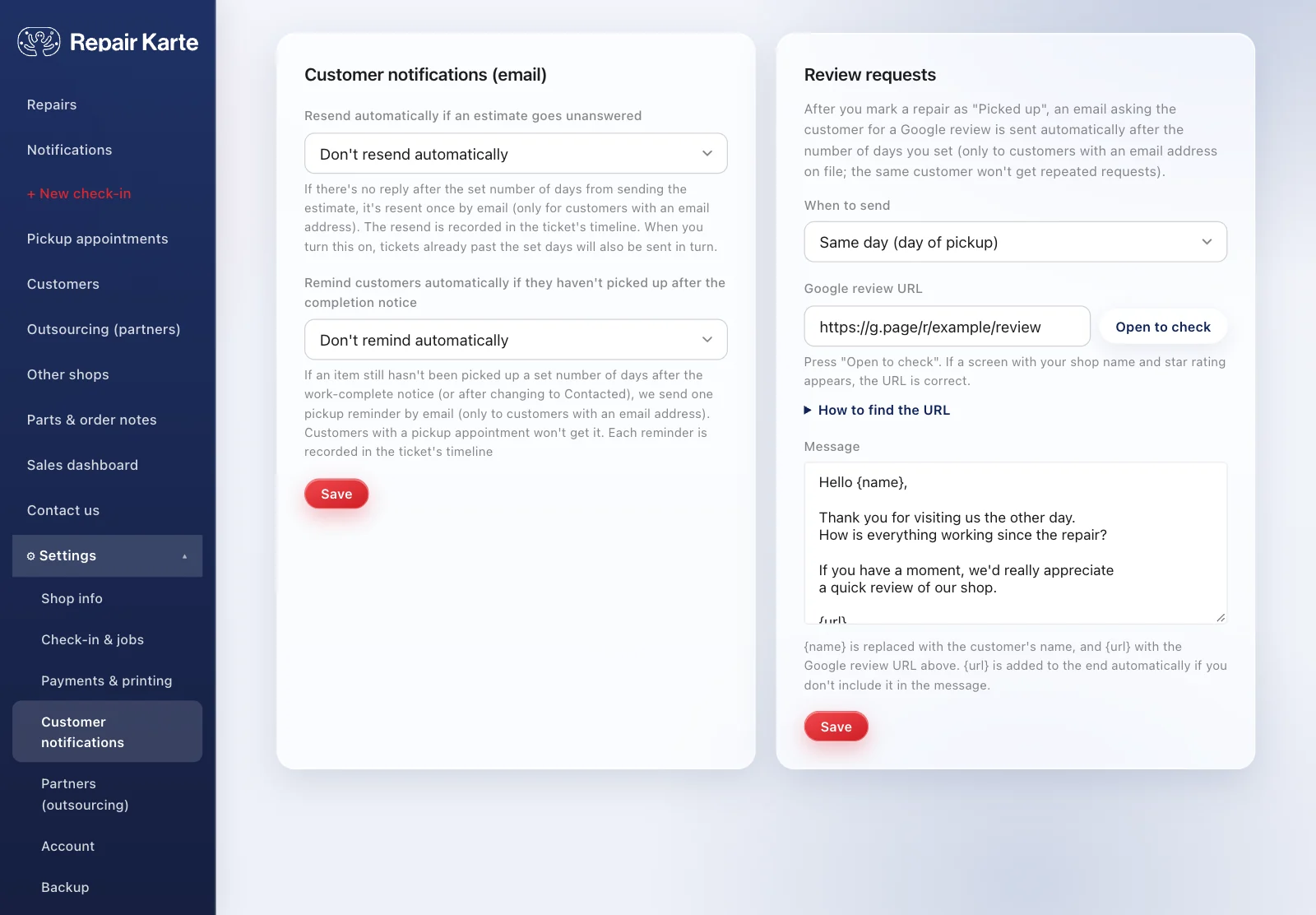
A set number of days after an item is handed back, the review request goes out on its own.
From the message they receive, customers go straight to the Google review page.
A customer gets one request a week at most, however many items they pick up, so it never feels insistent.
On the day of pickup, 1 day after, or 3 days after: you choose. It's off until you pick one in Settings. If a repair is marked cancelled after pickup, no request is sent.
Just your Google review link (starting with https://), pasted into Settings. You can copy it from your Google Business Profile.
Yes. Write your own message and insert the customer's name ({name}) and the review link ({url}). If you leave out {url}, the link is added at the end automatically.
No. A customer gets one request per week at most, however many items they pick up.
The Free plan covers up to 100 repairs a month for 1 staff login, with no credit card, and stays free. Automatic email updates to customers start on Standard. Every new account gets all Pro features free for 30 days.

