

Repair Claim Tags and Tickets: Numbering, What to Print, Shelf Locations, and Handing Back the Right Item
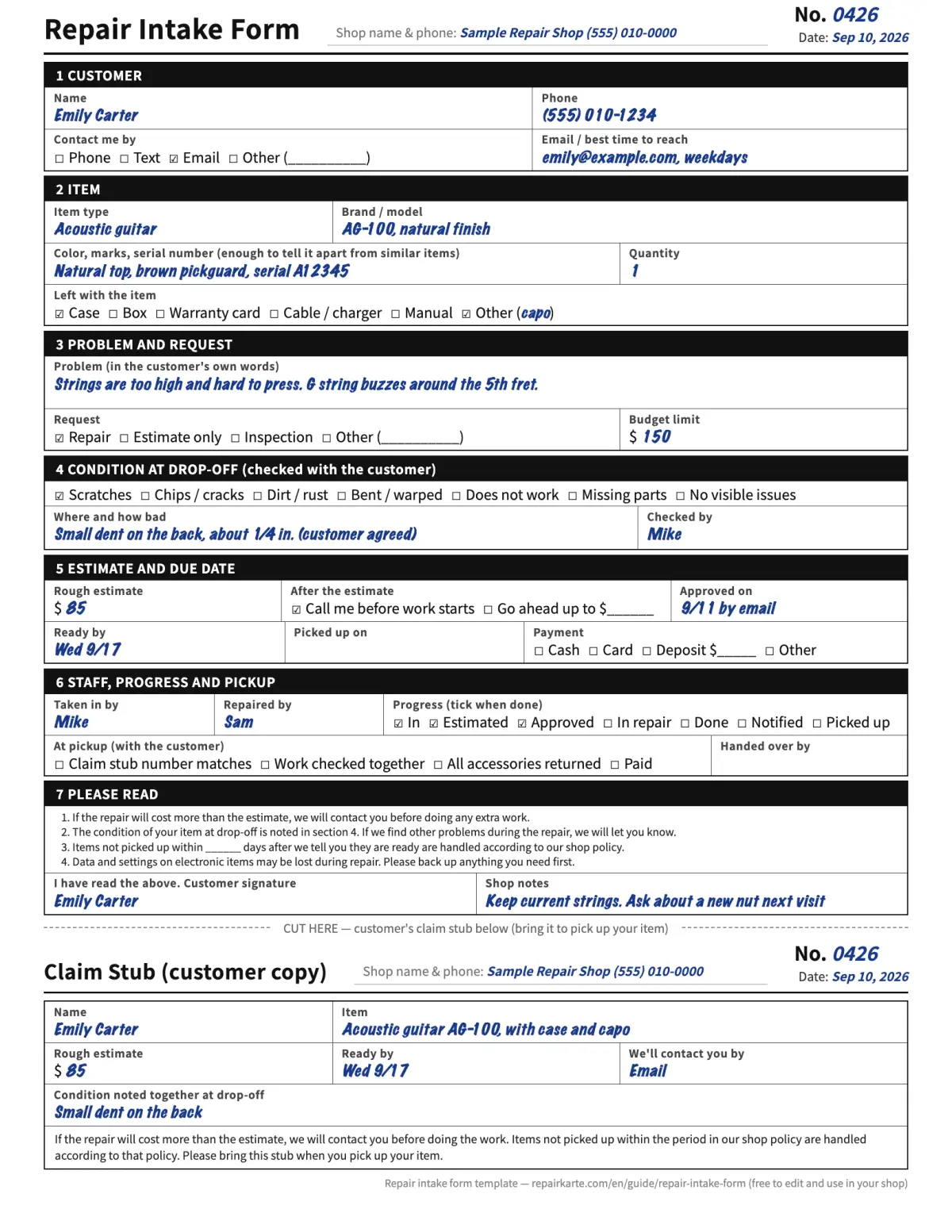
Paper: a work order with a tear-off ticket
The shop copy on top and the customer's claim ticket at the bottom, with the same number. PDF and Excel.
Free, no sign-up or email
Get the template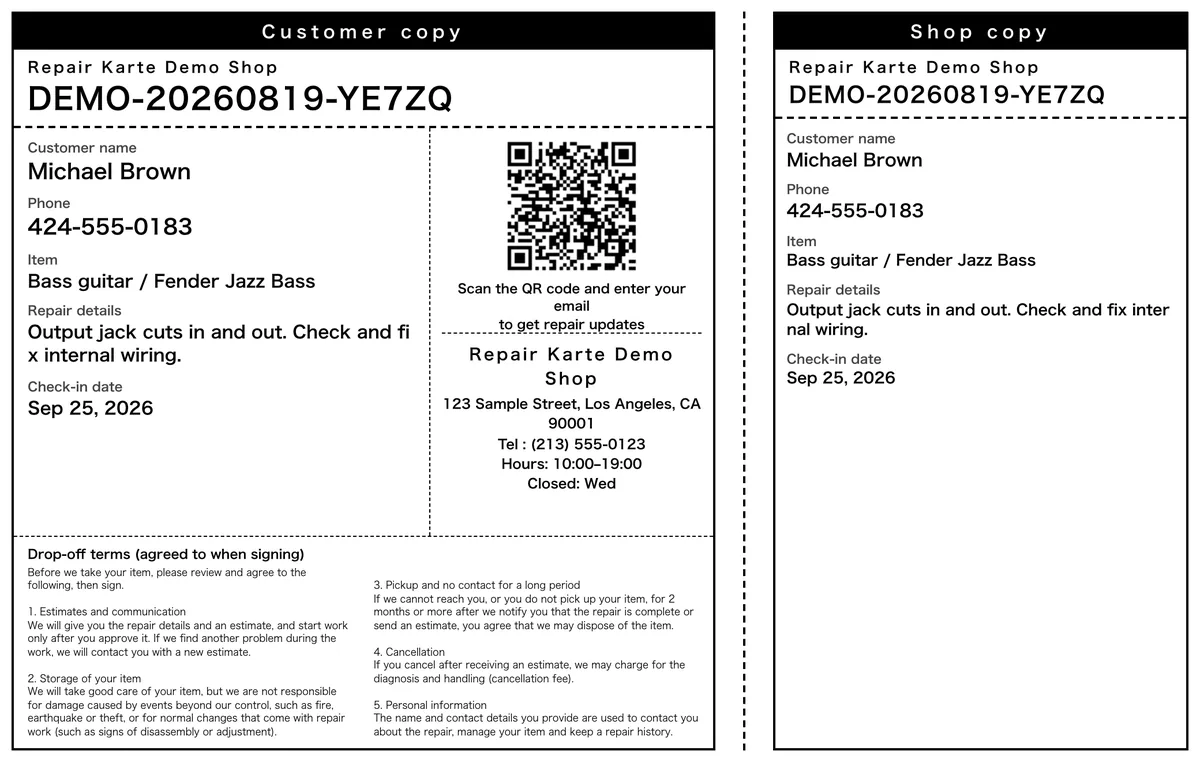
Numbered tags printed at check-in
The number is assigned for you, and the tag prints with a customer copy and a shop copy. Every plan.
Free plan: up to 100 repairs a month
Start free1. Key points
Give every item its own ticket number that never repeats, print it on a tag that stays with the item and on a stub the customer keeps, and write down where the item sits (a shelf or bin) on its record. At pickup, match the number, not the name. Note the condition at drop-off before you start work. That's most of what stops items from being mixed up, lost on a shelf, or argued about at the counter.
2. One number per item, never repeated
On paper, the simplest way is a running number: start at 0001 and keep going. Another way is the date plus a short code (20261026-A7). Either works, as long as a number never comes round again: don't restart by day, month or technician. Write the same number on the tag, the customer's stub and the record in your book, spreadsheet or software. If you take in several items from one customer, give each its own number; they can still share one customer record.
3. What to put on the tag and on the customer's stub
| What | Tag on the item | Customer's stub |
|---|---|---|
| Ticket number | Large, so it can be read from across the bench | Yes |
| Customer's last name | Yes, to tell two similar items apart | Their own copy, so optional |
| Item, in a few words | "Steel automatic watch", "Brown boots, size 9" | Yes |
| Date in and promised date | Yes | Yes |
| Work requested | Short version | Short version |
| Phone number | No (it's on the record) | Your shop's, so they can call you |
| Your drop-off terms | No | Yes, or a link to them |
4. How to attach tags, by type of item
- Watches and jewelry. A small zip bag with the tag inside, or a string tag through the strap. Never a sticker on the case.
- Shoes and bags. A string tag through a lace hole or handle. For pairs, tie both together or bag them with one tag.
- Instruments. A tag on the case handle and a second copy inside the case, in case they get separated.
- Phones, laptops and electronics. A tag in a bag with any charger or accessories, so accessories don't wander.
- Clothing. A safety pin through a seam allowance or the care label, never through the fabric face.
5. Shelf locations: find any item in seconds
Label your shelves or bins with short codes (A-1, A-2, B-1) and write the code on the item's record when you put it away. Move the item, update the code. Keep finished repairs on their own shelf, sorted by ticket number, so pickup is a walk to one spot. When anyone can find any item from the record, nobody has to remember where things are.
6. At pickup: hand over the right item
- Ask for the stub or the ticket number. Match the number, not just the name. Two Emilys with a watch is more common than you'd think.
- No stub? Check one more thing. The phone number on the record, or a photo ID. Write down that the stub was missing and how you checked.
- Someone else picking up. Ask the customer to tell you the name in advance, by text or email, and note it on the record.
- Show it before you hand it over. Open the bag, point out the work, and check accessories together. Disputes are cheaper at the counter than a week later.
7. Common mistakes
- Numbering by the day. "Tuesday #3" repeats every week. Use a number that never comes round again.
- Names instead of numbers on the shelf. Names repeat, get misspelled, and can be read by other customers. The number is enough on the item.
- Stickers on the item itself. They leave residue, fall off when warm, and can damage finishes. Tag the bag or the strap.
- A shelf location only in someone's head. "It's on the left somewhere" works until that person is off. Write the bin or shelf on the record.
- No note of condition at drop-off. Without it, a scratch noticed at pickup is your word against theirs. Note it, or take a photo, before you start.
8. Claim tags and shelf locations in Repair Karte
Each repair gets its own ticket number automatically (the date plus a short code, so it never repeats), and the claim tag prints at check-in with a customer copy and a shop copy on one sheet (every plan). From Standard, the tag has a QR code that opens the repair's status page. Customers sign the drop-off terms on screen. Add a shelf location on any repair record and it shows in the repair list, where you can search by it (every plan, no setup). Inspection checklists record the condition at drop-off and before pickup (every plan), and check-in photos you can draw on are on Pro.
9. Frequently asked questions
What is a repair claim tag?
A numbered tag that stays with the item while it's in the shop, with a matching stub or ticket the customer keeps. At pickup, the number on the stub is matched to the tag, so the right item goes to the right person.
What should be printed on a claim ticket?
The ticket number, the item in a few words, the date in and the promised date, the work requested, your shop's phone number, and your drop-off terms or a link to them.
What if a customer loses their claim ticket?
Check something else that only they would know or have, such as the phone number on the record or a photo ID, and write down that the ticket was missing and how you confirmed it.
Can repair software print claim tags?
Yes. Repair Karte gives each repair its own ticket number and prints a claim tag with a customer copy and a shop copy at check-in, on every plan. From Standard, the tag has a QR code that opens the repair's status page.
Doing this in Repair Karte
- Reception & Repair Records From intake to delivery, on a single record. (All plans)
The Free plan covers up to 100 repairs a month for 1 staff login, with no credit card, and stays free. Automatic email updates to customers start on Standard. Every new account gets all Pro features free for 30 days.
More guides
By trade