

Repair Estimate Template (Free Excel): What to Include, How to Write It, and Getting the Customer's Approval
Fill in, print or email
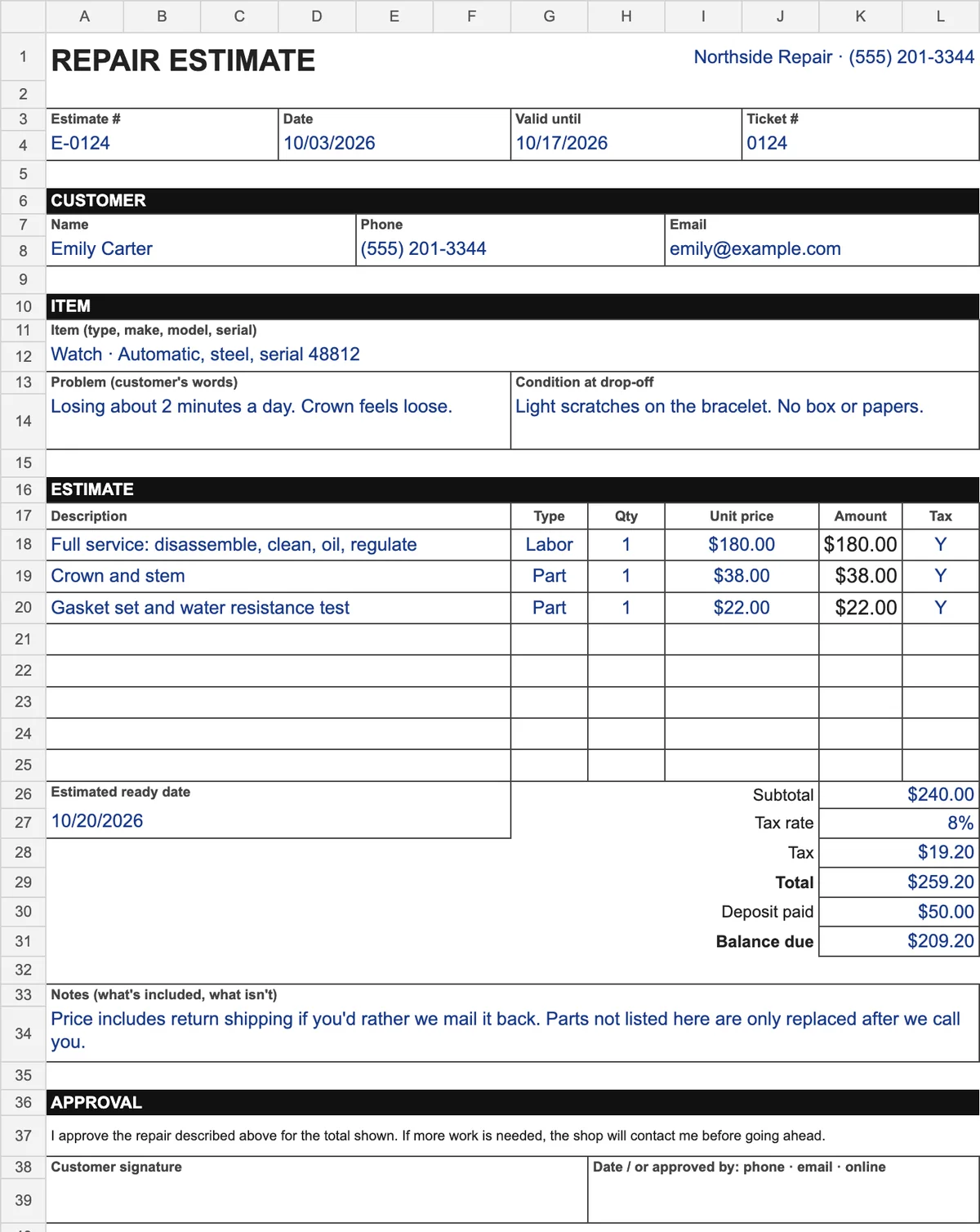
Amounts, tax, total and balance due are worked out for you. You enter your own tax rate. One page, US Letter.
Free, no sign-up or email
Download Excel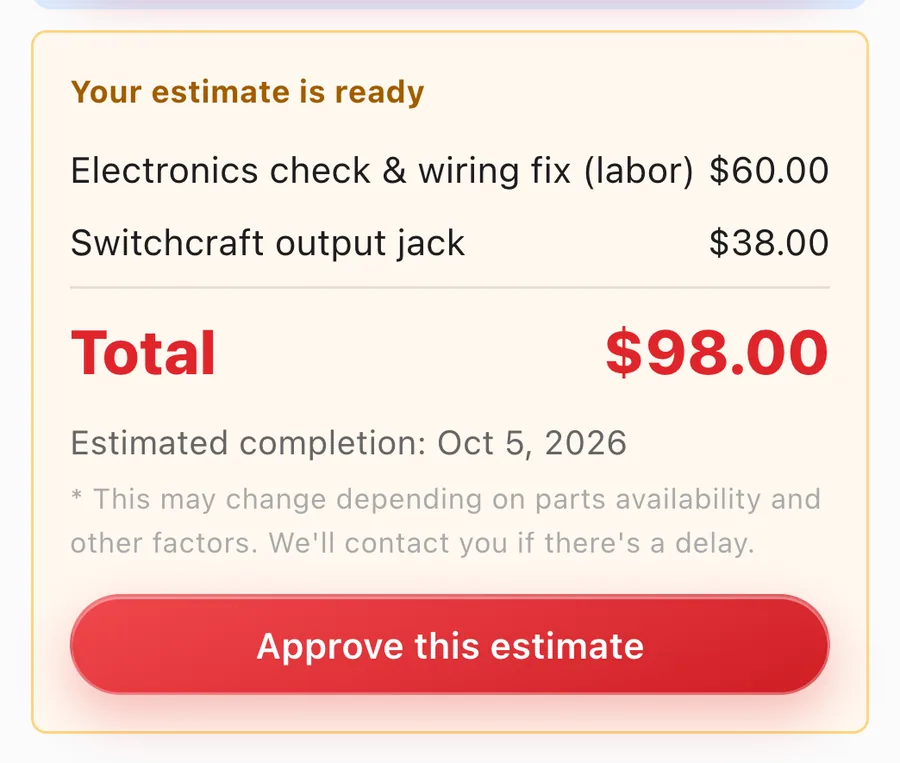
Customers approve on their phone
The estimate goes to the customer's status page, where they slide to approve. Online approval is on every plan.
Free plan: up to 100 repairs a month
Start free1. Key points
A good repair estimate lists the item and problem, one line per job or part, the total with tax, a ready date, what isn't included, and how the customer approved. The free Excel template on this page works out amounts, tax and the balance due for you; enter your own tax rate. Get the approval in writing (a signature, an email reply or an online approval) and most disagreements at pickup never happen.
2. What to put on a repair estimate
| Field | Why it's there |
|---|---|
| Estimate number, date, valid until | A number to refer to on the phone, and a date after which the price may change. Parts prices move. |
| Ticket number | Ties the estimate to the item on your shelf and to its intake record. |
| Customer: name, phone, email | Who approves, and how you'll reach them with the answer. |
| Item, problem, condition at drop-off | What you're quoting on. Writing the problem in the customer's words and the scratches you saw avoids "that's not what I asked for" later. |
| Line items: description, labor or part, qty, unit price | One line per job or part. Separate lines make it easy for the customer to say yes to some and no to others. |
| Subtotal, tax, total | Tax only on the lines that are taxed where you are. Show the total the customer will actually pay. |
| Deposit and balance due | If you take money up front, show what's left so pickup has no surprises. |
| Estimated ready date | The question every customer asks next. Give a date, not "a couple of weeks". |
| Notes: what's included, what isn't | Return shipping, cleaning, or "parts not listed are only replaced after we call you". |
| Approval: signature, or how they approved | Your record that the customer agreed. Phone and email approvals count too, if you write down when. |
3. How to write it, in five steps
- Look first, quote second. Open it up or test it before you write numbers. If you can't know until you're inside, quote the diagnosis first and say so.
- Split labor and parts. One line per job and per part. A single "Repair: $260" invites haggling; a list explains itself.
- Say what's not included. Anything you might find later goes in Notes as "we'll call you first". Extra work then becomes a new yes, not a surprise on the bill.
- Give a ready date and a valid-until date. Both protect you. The first sets expectations; the second covers price changes on parts.
- Get the yes in writing. A signature at the counter, a reply to your email, or a note of the date and time they said yes on the phone.
4. Common misunderstandings, and how to avoid them
- "I thought it was the total". The customer remembers the labor price and forgets parts and tax. Put the total, with tax, in the biggest type on the page.
- Approved on the phone, disputed at pickup. Without a written note of when they said yes and to what, it's your word against theirs. Write the date, time and amount on the estimate.
- Extra work done without asking. Even small additions feel like overcharging when they show up unannounced. Call first, add a line, get a second yes.
- The estimate nobody answered. Customers rarely say no; they forget. Follow up after a few days, by text or email, with the total and the ready date.
5. Sending estimates in Repair Karte
Save the estimate on the repair's record and it appears on the customer's status page, where they approve with one slide or decline (every plan). On Standard and Pro, the estimate is emailed automatically when you move the repair to Estimated, and a reminder can go out if they haven't answered. You can also print a one-page estimate with the same line items on every plan; from Standard it carries a QR code to the status page.
6. Frequently asked questions
What should a repair estimate include?
The customer and item, the problem in the customer's words, one line per job or part with quantity and price, subtotal, tax and total, the estimated ready date, what isn't included, and a place for the customer's approval.
How long should a repair estimate be valid?
Many shops use one to four weeks. Pick a period that matches how often your parts prices change, and write the date on the estimate.
Is a phone approval enough?
It can be, if you write down when the customer said yes and to what amount. A reply to an email or an online approval leaves the record for you.
Can customers approve a repair estimate online?
Yes. In Repair Karte, the estimate appears on the repair's status page, where the customer approves it with one slide or declines it, on every plan. On Standard and Pro the estimate is emailed automatically, and a reminder can go out if they haven't answered.
Doing this in Repair Karte
- Reception & Repair Records From intake to delivery, on a single record. (All plans)
- Email Updates Approvals and updates, straight to their inbox. (Standard / Pro)
The Free plan covers up to 100 repairs a month for 1 staff login, with no credit card, and stays free. Automatic email updates to customers start on Standard. Every new account gets all Pro features free for 30 days.
More guides
By trade