

Repair Ready for Pickup: How to Tell Customers, Message Templates (Text & Email), and Stopping Finished Repairs from Piling Up
Ready-for-pickup messages to copy
A text, an email, a one-week reminder, a final notice and a voicemail script. Change the names and send.
Free, no sign-up
See the templates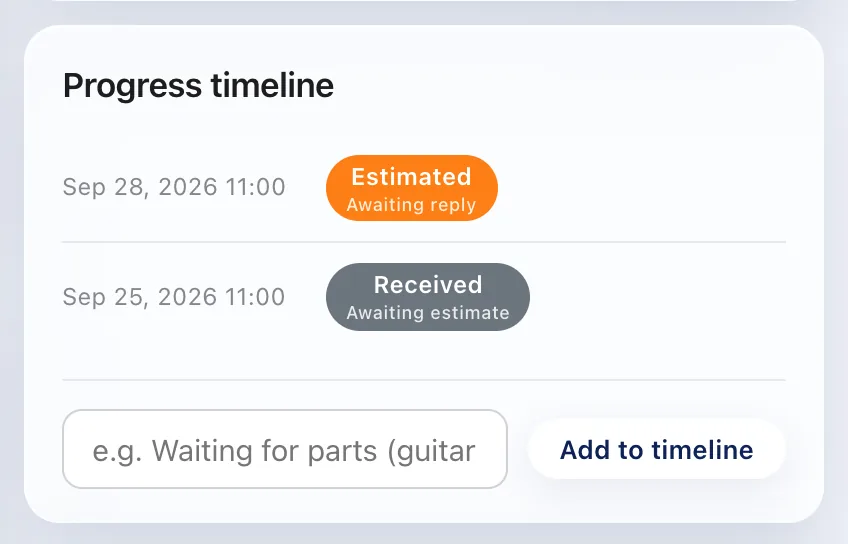
The pickup email goes out for you
Mark the repair done and the customer gets an email with a link to their status page. Automatic emails are on Standard and up.
Free plan: up to 100 repairs a month
Start free1. Key points
Finished repairs pile up on the shelf when the shop treats "I called" as the end of the job. Count a repair as reported only when the customer actually knows: they answered, or they replied. Write down the result of every attempt (reached, no answer, left a message), check every morning for finished items whose customer doesn't know yet, and after two missed calls, switch to a text or email. The message templates below cover the first notice, a one-week reminder and a final notice.
2. A real case: finished, and the customer didn't know for a month
This happened at a repair shop that was still running on paper tickets.
- A repair was finished and the shop called the customer. Nobody answered.
- Because the call had been made, the shop took it as done. Nobody called again, and the days went by.
- About a month later, the customer called: "When will my repair be ready?" The paper ticket wasn't at hand, so the shop promised to call back.
- They found the ticket by the customer's name and number. There was no record of when they had called, and nobody remembered.
The repair had been finished long before. The customer found out about a month later, and only because they called themselves.
3. Why finished repairs go unreported
- "I called" feels the same as "they know". Once you've dialed, the job feels done. A call that went to voicemail and a call where you talked to the customer are the same "I called them" in your memory. What gets missed is rarely the first call. It's the second one.
- There's nowhere to write the result. Most tickets and logs have a box for "done", but none for when you contacted the customer, how, and whether it got through. What has no place to be written down lives only in someone's head.
- A finished repair doesn't bother anyone. Jobs in progress get noticed as the due date gets close. A finished item on the shelf is, for the shop, a closed job. The only person who's waiting is the customer, so nothing in the shop reminds you.
4. Don't stop at "I called": record the result
Every attempt gets one of three results. Only the first one moves the repair on.
| Result | What it means | What to do |
|---|---|---|
| Reached | You spoke to the customer, or they replied to your text or email | Change the status to Customer notified |
| No answer | No pickup, no reply | Leave the status as it is and pick the day for the next try |
| Left a message | Voicemail, or a message with someone else | Leave the status as it is. You don't know it reached them, so check again |
In a spreadsheet, that means two statuses instead of one: Done (customer not told) and Customer notified. The free repair log template has both, and colors the first one so it stands out.
5. The morning check: only the ones they don't know about
Every morning, look at finished repairs whose customer hasn't been reached, and nothing else. Call or message each one, write down the result, and you're done. Items that are already Notified and waiting on the shelf get a reminder later, not a call every day. It takes a couple of minutes, and it's the one habit that stops a repair from sitting for a month.
6. When you can't reach them
- Try a different time. If they didn't answer at noon on a weekday, they won't answer at noon tomorrow either. Try late afternoon or the weekend. Asking "what's the best time to reach you?" at drop-off makes the first call land.
- Switch to text or email. After two missed calls, send it in writing. A text or email can be read whenever suits them, and you have the time it was sent.
- Put everything in the voicemail. "We'll try again" tells the customer nothing. Say the shop's name, the item, that it's ready, your hours and your number. Even then, record it as Left a message, not Reached.
7. Ready-for-pickup message templates
Change the names, item and numbers, and keep them short. Every message says who you are, which item, that it's ready, what it costs and when you're open.
Ready for pickup (text message)
Hi Emily, this is Northside Repair. Your watch (ticket 0124) is ready. Total $85. Open Tue to Sat, 10 to 6. Reply here if you have any questions.
Ready for pickup (email)
Subject: Your watch is ready for pickup (ticket 0124)

Hi Emily,

Good news: the repair on your watch is finished. We replaced the battery and the gaskets and checked the water resistance.

Total: $85
Pickup: Tuesday to Saturday, 10 am to 6 pm, at 123 Main Street
Please bring your claim ticket (number 0124) or a photo ID.

Thank you,
Northside Repair
(555) 201-3344
Reminder after a week
Hi Emily, a quick reminder from Northside Repair: your watch (ticket 0124) is ready and waiting for you. We're open Tue to Sat, 10 to 6. If someone else will pick it up, just let us know their name.
Final notice, a few weeks later
Hi Emily, this is Northside Repair about your watch (ticket 0124), ready since October 3. We'd like to get it back to you. Please reply or call (555) 201-3344 to let us know when you can come in, or if you'd like us to ship it.
Voicemail script
Hi, this is Sam from Northside Repair calling for Emily Carter. Your watch, ticket 0124, is repaired and ready to pick up. The total is $85. We're open Tuesday to Saturday, 10 to 6. You can call us back at (555) 201-3344. Thanks!
8. Common mistakes
- One "done" mark for everything. Once "done" is written on the ticket, you can't tell whether it's repaired, the customer was told, or it was picked up. At the very least, "repaired" and "customer knows" need separate marks.
- Saving the calls for Friday. The more calls you batch, the less you remember about each one. The repair that gets reported the day it's finished, by the person who finished it, is the one that doesn't get missed.
- Tracking call-backs on sticky notes. Sticky notes fall off, pile up, and don't say when they were written. Items that need another try belong on a list, one line each.
- Only asking for a phone number. Plenty of people can't take calls during the day. At drop-off, ask for one more way to reach them: a cell number for texts, or an email.
9. Doing this in Repair Karte
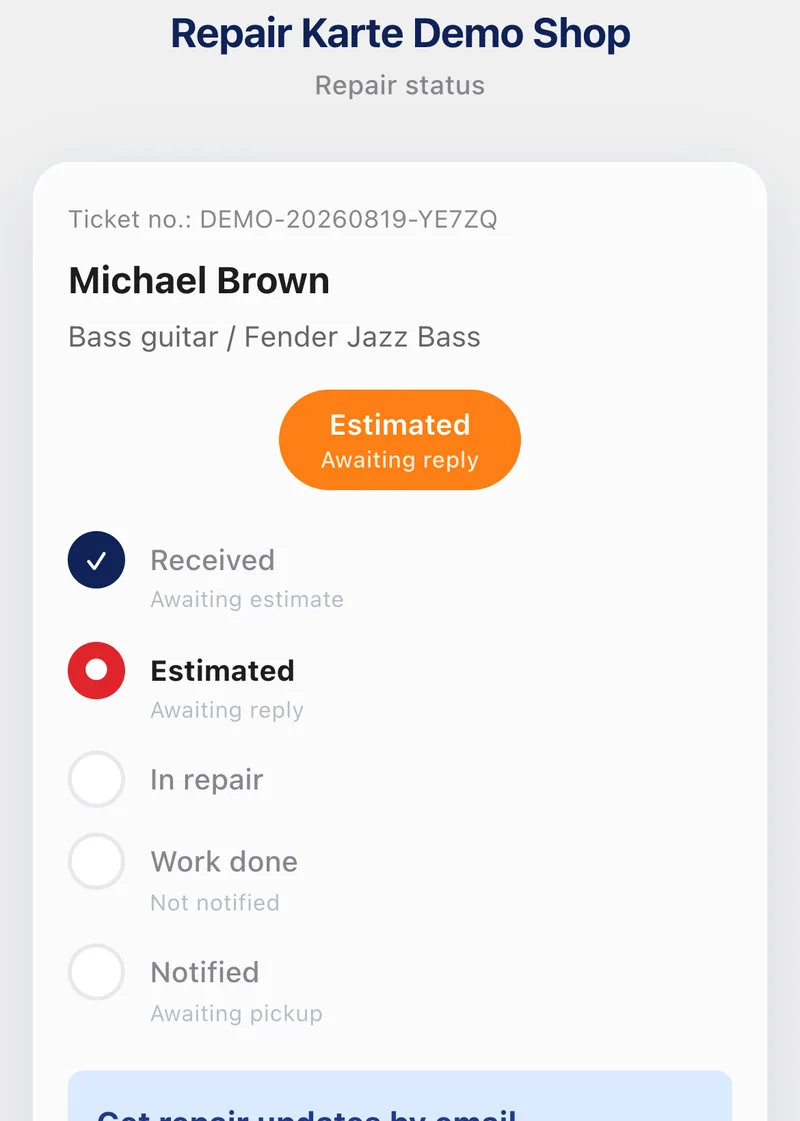
Statuses work the same way as above: Work done (Awaiting confirmation) until the customer knows, then Notified (Awaiting pickup). On Standard and Pro, marking a repair done emails the customer with a link to their status page, so the first notice goes out the moment the work is finished. If the item is still waiting, a one-time pickup reminder can go out after 3, 5, 7 or 14 days (Standard and Pro; off until you switch it on). Status changes and automatic reminders are kept on the repair's timeline with the date and time, so "did we tell them?" has an answer.
10. Frequently asked questions
Should I call, text or email when a repair is ready?
Whatever the customer is most likely to see. Many shops send a text or email first, because it can be read at any time and leaves a record of when it was sent, then call if there's no reply after a few days.
How long should I wait before sending a pickup reminder?
About a week is common for the first reminder, then a final notice a few weeks later. Pick numbers that fit your shop and stick to them, so every customer is treated the same.
What should a ready-for-pickup message include?
The shop's name, the item, the ticket number, that it's ready, the amount due, your hours, and how to reach you. Leave out anything that needs a reply to make sense.
Can repair software send the pickup message automatically?
Yes. In Repair Karte, marking a repair done sends the customer an email with a link to their status page (Standard and Pro), and a one-time pickup reminder can go out after 3, 5, 7 or 14 days if the item is still waiting (also Standard and Pro). The reminder is off until you switch it on.
Doing this in Repair Karte
- Email Updates Approvals and updates, straight to their inbox. (Standard / Pro)
The Free plan covers up to 100 repairs a month for 1 staff login, with no credit card, and stays free. Automatic email updates to customers start on Standard. Every new account gets all Pro features free for 30 days.
More guides
By trade