

Repair Status Page: Let Customers Check Their Repair Online and Stop the "Is It Ready Yet?" Calls
What a status page should show
Five things to show, four to keep off it, and status words customers understand.
Free, no sign-up
See the checklist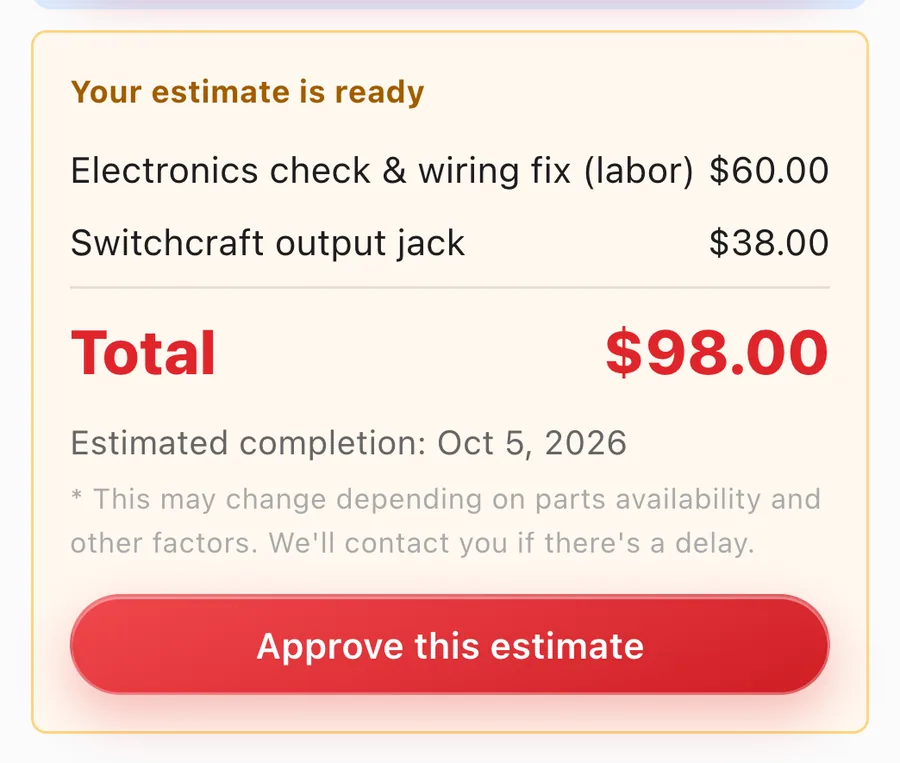
A status page for every repair
Progress, the estimate and online approval, on every plan. Customers can also look up their repairs by phone number.
Free plan: up to 100 repairs a month
Start free1. Key points
Most "is it ready yet?" calls stop when customers can see the answer themselves. Give every repair a status page that shows the current status in plain words, the estimate with a way to approve it, and the ready date; let customers reach it from a link, a QR code on the claim ticket, or a look-up by phone number; and change the status the moment the work changes. A status page that isn't kept current does more harm than none.
2. Four ways to keep customers informed
| Way | What it does well | What it costs you |
|---|---|---|
| You call when something changes | Personal, and you hear their answer right away | Calls go unanswered, and every update takes your time at the bench |
| A text or email at each step | Customers read it when it suits them, and you have a record | Still one message per change, unless your system sends it for you |
| A status page for each repair | Customers check whenever they want, as often as they want, without calling | Only as good as your updates: the status has to be kept current |
| Look-up by ticket or phone number | Works even if the customer lost the link | Needs a limit on look-ups so nobody can guess numbers |
3. What to show on a status page, and what to keep off it
- Current status, in plain words. "Estimate ready: waiting for your OK" beats an internal code.
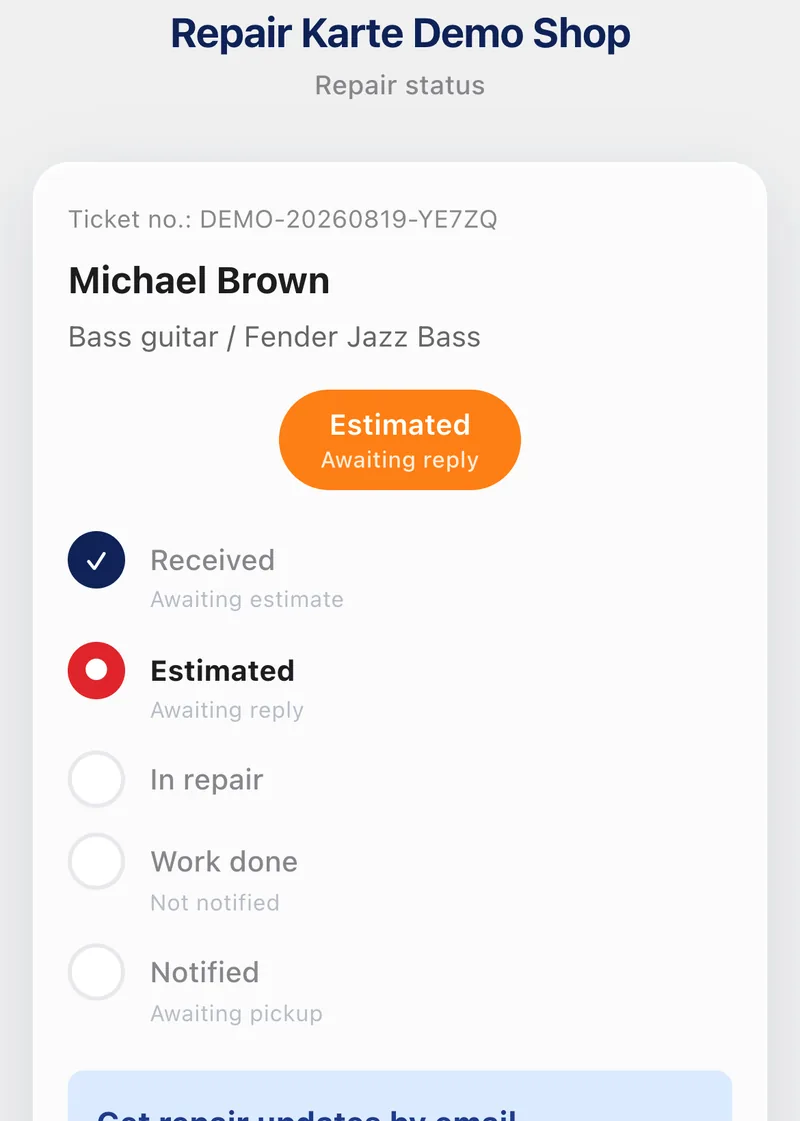
- The item, as they'd describe it. So they know it's theirs: "Bass guitar / Fender Jazz Bass".
- The estimate, and a way to approve it. The status page is where the yes happens, without phone tag.
- The ready date. The question behind most calls.
- Your hours, address and phone. Everything they need to come and pick it up.
Keep off it:
- Internal notes and technician comments
- Full phone numbers and email addresses
- Other customers' repairs, even with the same name
- Parts costs or margins
4. Status words customers understand
| What you call it at the bench | What the customer should read |
|---|---|
| Received / awaiting diagnosis | We have it and we're taking a look |
| Estimate sent | Your estimate is ready: we're waiting for your OK |
| In progress / waiting for parts | We're working on it (parts on the way) |
| Done, customer not told | Ready for pickup |
| Picked up | Picked up. Thank you! |
5. How customers find their page
- A link in every message. The estimate email, the "ready" text: each one links to the same page.
- A QR code on the claim ticket. The paper they keep becomes the way back to the page, even after the emails are gone.
- A look-up on your website. By ticket number or phone number, with a limit on how many look-ups one visitor can make.
6. Common mistakes
- Forgetting to update it. A status page that says "in progress" a week after the work was done is worse than none. Change the status the moment the work changes.
- Too many steps. Customers don't need eleven stages. Five or six that each mean something to them is plenty.
- Shop jargon. "Awaiting QC" and "bench 2" mean nothing to the customer. Use the words they would.
- No way back to the page. If the only link is in one email, it's lost the day they delete it. Put a QR code on the claim ticket, or let them look it up by phone number.
7. Status pages in Repair Karte
Every repair has its own status page, on every plan: the current status, each step, the item, the estimate and the ready date. Customers approve the estimate there with one slide, and they can look up their recent repairs by phone number on your shop's status page (look-ups from one place are limited). When you move a repair to the next status, the page changes with it. On Free you share the link yourself; from Standard, the claim tag carries a QR code to the page and the customer is emailed when the estimate is ready and when the work is done.
8. Frequently asked questions
How can customers check their repair status online?
Give each repair its own status page and send the customer the link, put a QR code to it on the claim ticket, or let them look up their repairs by ticket or phone number. The page shows the current status, the estimate and the ready date.
What should a repair status page show?
The current status in plain words, the item, the estimate with a way to approve it, the ready date, and your hours and contact details. Keep internal notes, full contact details and other customers' repairs off it.
Is it safe to let customers look up repairs by phone number?
It is when the page shows only that customer's repairs and the number of look-ups from one place is limited, so nobody can try numbers one after another.
Does Repair Karte have a customer status page?
Yes, on every plan. Each repair has a status page with its progress and estimate, customers approve the estimate there, and they can look up their repairs by phone number on your shop's status page. From Standard, the claim tag has a QR code to the page and updates are emailed automatically.
Doing this in Repair Karte
- Email Updates Approvals and updates, straight to their inbox. (Standard / Pro)
- Customer Management Be the shop that says, “Same issue as last time, right?” (All plans)
The Free plan covers up to 100 repairs a month for 1 staff login, with no credit card, and stays free. Automatic email updates to customers start on Standard. Every new account gets all Pro features free for 30 days.
More guides
By trade