Every repair gets its own status page that the customer can open on their phone, on every plan. It shows where the repair is, each step so far, the estimate, and the ready date, and the customer approves the estimate right there. Customers who lost their claim tag can look up their repairs by phone number. When you move the ticket to the next status the page changes with it, so you get far fewer "is it ready yet?" calls.
Available on: All plans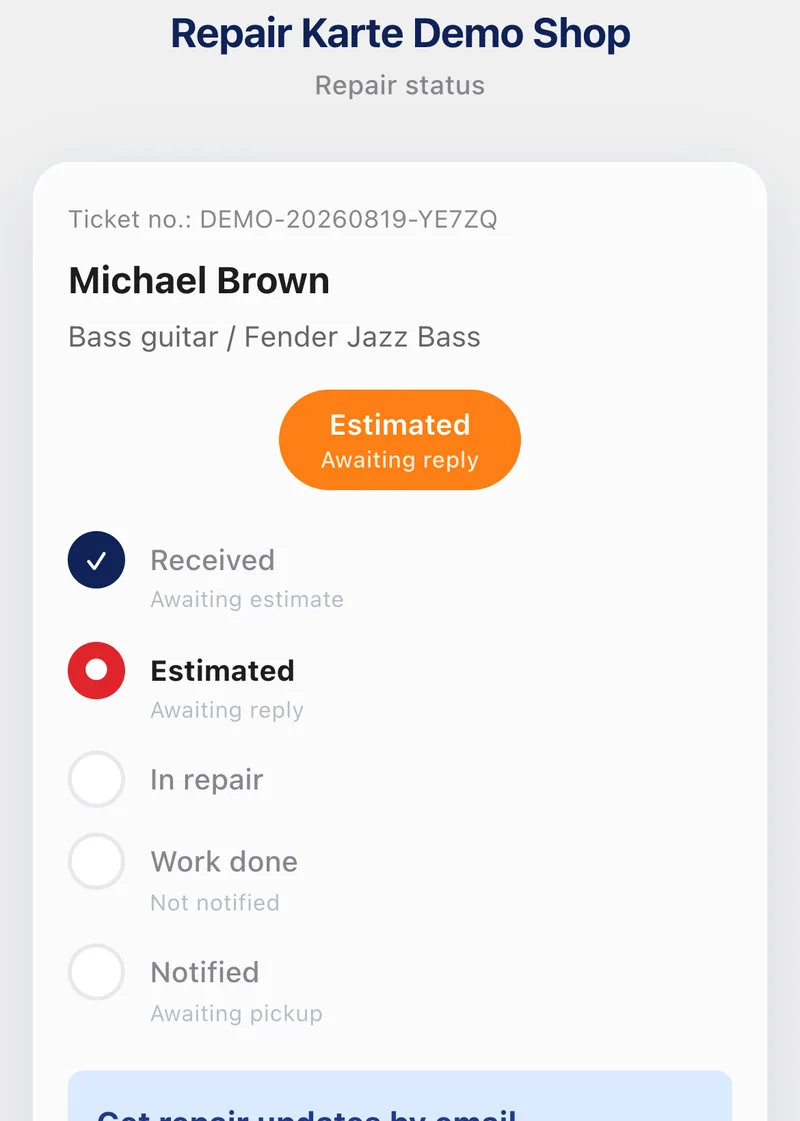
The current status sits at the top in large type, with a timeline underneath: Received, Estimated, In repair, Work done, Notified. Finished steps get a tick. Move the ticket on in Repair Karte and the page changes at the same moment.
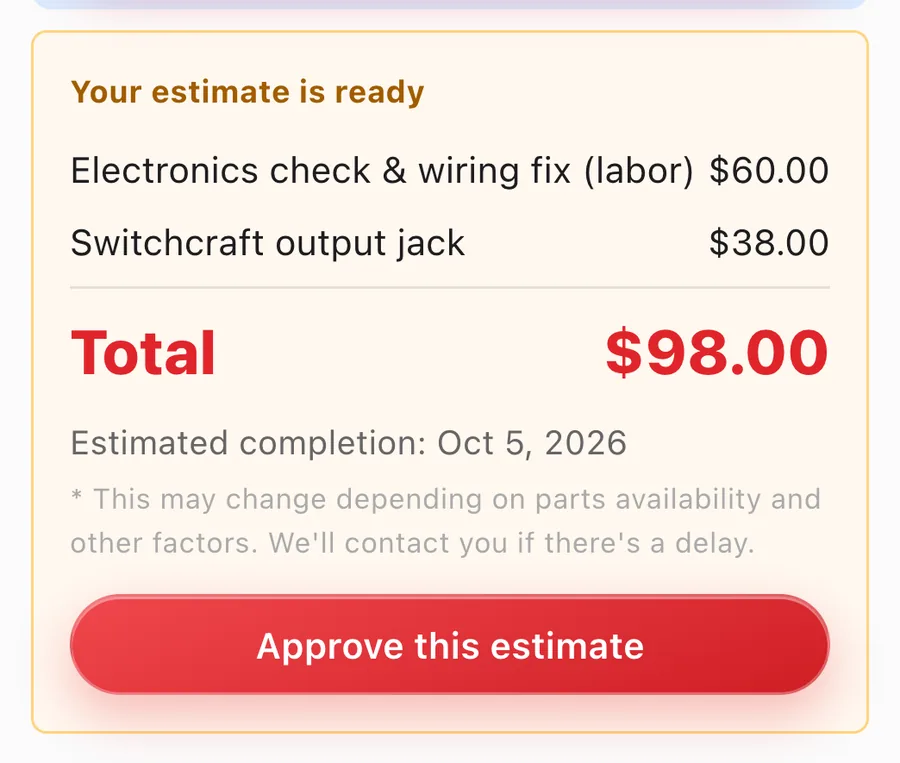
Before the final estimate, the customer sees your rough estimate, as a range if you like. Once you send the final estimate, they see each line, the total, the ready date and your note, and slide to approve. Until the repair starts, they can also cancel from the same page, with any cancellation fee shown first.
On your shop's status page, customers enter their phone number to see their repairs and open each one. Look-ups are limited both per connection and per phone number, so nobody can try numbers one after another to find other people's repairs.
When the work is done, the customer slides "Slide to confirm" on the page to let you know they've seen it (on Pro, booking a pickup time or choosing "Confirm without booking" does the same). The repair report you wrote opens from here too. On Pro they can also pick the pickup time, and where you've connected online payments (Standard and up) they can pay by card before they come in.
Every new ticket gets its own status page automatically. There's nothing to set up or switch on.
The QR code on the customer copy and the link in every estimate and "work done" email open the page. On Free, open Customer page on the ticket and send the customer that link yourself.
Plan: QR code and automatic emails: Standard and up
Send the estimate, start the repair, finish the work. Each time you move the ticket on, the page shows the new status.
When a customer approves, cancels or confirms the finished work, it shows up in your Notifications. An approval moves the ticket to In repair by itself.
Yes. The status page, online estimate approval and look-up by phone number are on every plan. From Standard, the customer copy also carries a QR code to the page, and customers who've given an email address (or connected SMS or WhatsApp) are notified automatically when the estimate is ready and when the work is done.
No. The page opens in any phone browser from the link or the QR code, with no app and no sign-up. A Share button lets them pass it on, say to the family member who'll pick the item up.
They see their own repair: the status, the item, the estimate lines and total, the ready date, and any fields you've set to Show to customer. Internal categories such as parts and labor, your ticket notes, and check-in photos are never shown, and phone look-up results don't include contact details.
Open Customer page on the ticket and you see exactly what they see, so you can talk them through it. Send them the link while you're at it, and next time they can check for themselves.
Yes (mail-in repairs are on Standard and up). Once the work is done, the page shows payment choices, payment confirmation and shipping progress instead of pickup booking. Customers who pay by bank transfer use "Slide to report payment" so you know to check. The page never shows the customer's address.
Yes. When you've taken a deposit, the page shows what's been paid and what's left, using the same wording as your printed slips and repair report, so there are no surprises at pickup.
Where your shop has connected SMS or WhatsApp, customers can sign up from this page or from the QR code on their claim tag. Each customer picks one way to hear from you, and every update goes there.
The Free plan covers up to 100 repairs a month for 1 staff login, with no credit card, and stays free. Automatic email updates to customers start on Standard. Every new account gets all Pro features free for 30 days.